Getting spam calls is very frustrating. For a week onwards, I have been suffering with spam calls, and all spam calls are about car insurance, life insurance, bank loans, etc. I thought it might be an important call I would lift. After lifting, I came to know that it was a spam call. So, finally, I decided to stop these spam calls. I have collected some tips to stop spam calls for my mobile. I will share those all tips without. I have tested all these tips on my phone those worked for me. These tips will make you out of the spam calls. In this guide, I will be mainly focusing on how to stop spam calls on android in 2026. So, Let’s get into the topic
Why Are Spam Calls Increasing?
Previously, I used to get one or two spam calls for a week. But now I am getting more spam calls in one day, I will get Atleast 5 spam calls. The reason behind these spam calls is just sharing your phone number by signing up in apps or websites. Scammers will use automated dialing systems to call more numbers. Scammers have become more advanced because they are using local phone numbers to appear trustworthy on mobile screens. These are the main reasons behind spam calls. By knowing why it happens doesn’t fix the problem right! Now, let’s get into tips to reduce spam calls.
Common Types of Spam Calls
| Type | Example |
|---|---|
| Banking Scams | Fake calls claiming your account is blocked |
| Loan Offers | Pre-approved personal loan calls |
| Insurance Sales | Health or vehicle insurance promotions |
| Investment Scams | Crypto and trading schemes |
| Government Impersonation | Fake Aadhaar, PAN, or tax-related calls |
Step 1: Turn On Caller ID and Spam Protection (Built Into Android)
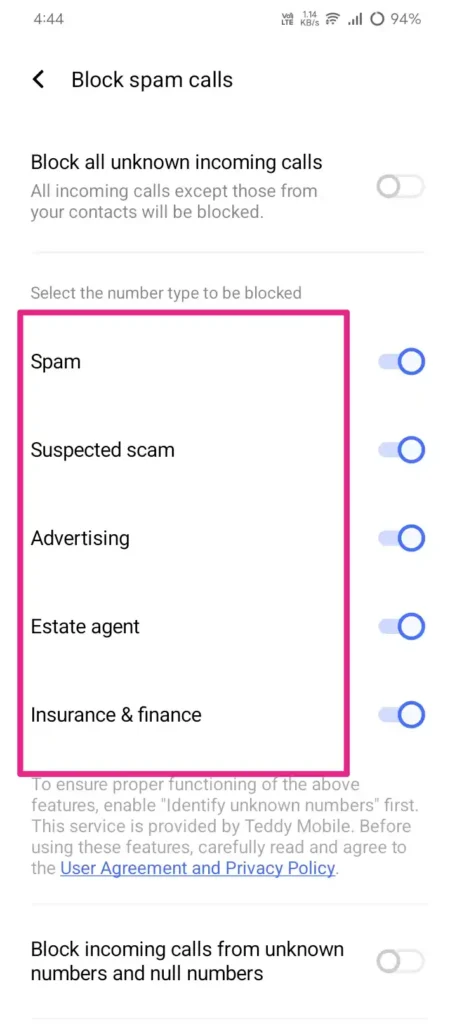
This is the first important step that all must do. So most of the Android phones come with Google apps, and they have a spam detection feature that you just have to turn on.
According to me, this is an important step because it worked for me. This made a big difference in blocking spam calls for my mobile.
Follow the steps below to turn on caller ID and protect from spam calls
- Open the Phone app.
- Tap the three dots in the top right corner.
- Go to Settings
- Tap Spam and Call Screen
- Turn on “See caller and spam ID.”
- Also, enable “Filter spam calls.”
Once when you turn on the settings, Google will compare your incoming calls with the database of reported spam calls. If your incoming number matches with Google database-reported spam call, then it will show a suspected spam caller on your screen before you pick up the call.
Step 2: Try Call Screen (This One Genuinely Surprised Me)
If you are using a Pixel phone or Samsung or any android phones with google phone app There is a feature called call screen when an unknown number calls Instead of lifting the phone you tap on screen call and Google Assistant will ask the caller What is the reason for calling And you can see a script on your screen whatever they are saying by that you can decide to pick up or hang up or mark it as spam.
When I am using it, some of the bank members call me, and they said hi, I’m calling regarding a loan eligibility, so I just tapped on report a spam without talking to them. This is the best way to identify a spam call.
Follow the steps below to enable call screen
- Open Phone app then select three dots go-to Settings
- Tap Spam and Call Screen
- Enable Call Screen
Step 3: Use Truecaller (But Read This First)
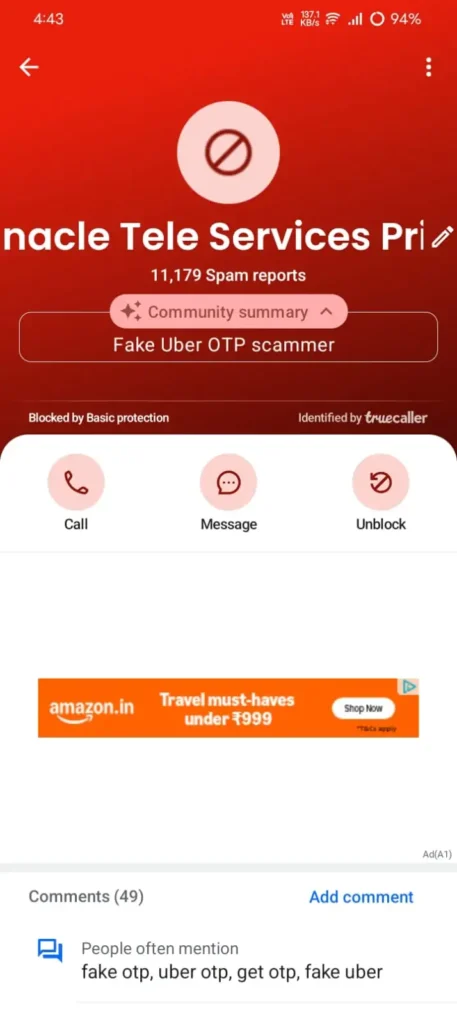
Using Truecaller to detect spam calls is the best option. Nowadays, everyone has installed Truecaller on their mobiles to avoid spam calls.
I have been using Truecaller for one month. If any spam Call comes, then it shows scam in red Colour on the screen.
But Truecaller asks for permission to access your contacts and call logs to improve its database. By accessing your contacts, it can recognize whether the incoming call is a spam call or a genuine call. If it shows the wrong name for the incoming call, you can also suggest the correct name to Truecaller.
Follow the steps to set up TrueCaller:
- Go to Settings then select Blocking and enable “Block top spam reports.”
- Download Truecaller from the Play Store
- Sign up using your phone number.
Step 4: Manually Block Repeat Offenders
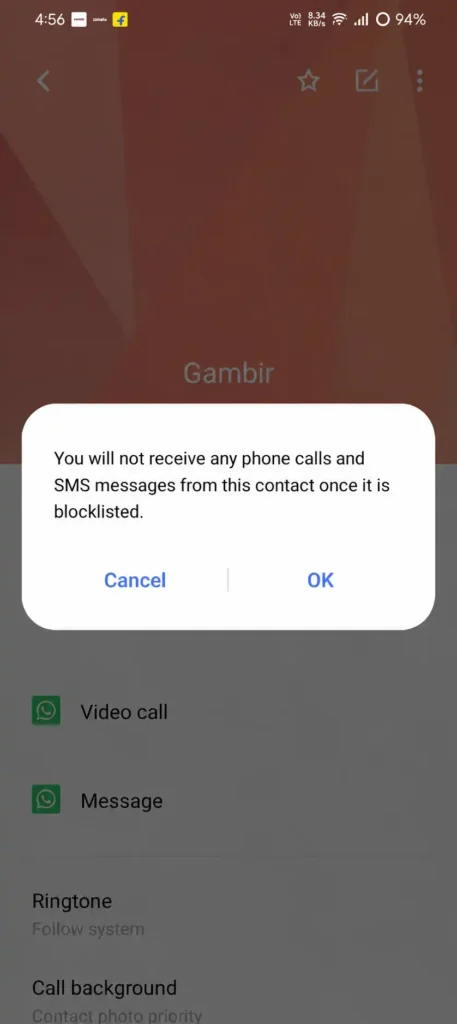
You can also block the spam calls manually by using your normal phone app. You can also use both the phone app and True Caller to block that number completely. After blocking the number again, if you get the call, then Truecaller shows ‘The incoming call is blocked by Truecaller.’
To block a number manually:
- Go to your Phone app, then select the Recents tab
- Find the number you want to block
- Tap on it, then tap Block or report spam
- Confirm, and you can also report it as spam in the same step
The main advantage If you are using Truecaller is that there is an option to add numbers to a personal blocklist
Step 5: Stop Sharing Your Real Number Everywhere
This is main important step that keeps you completely out of spam calls.
Avoid Giving Your Number To
- Try to avoid giving your number to random giveaway websites.
- Don’t try to register in Survery websites using your number.
- Before registering in shopping websites make sure wheather it is geniune or fake.
- Don’t provide phone numbers for free consultation forms
Better Alternatives
- Use a secondary SIM card for your external purpose.
- Try to use a dedicated number for registrations.
- You can use your secondary SIM card for all the external purposes like registaring into websites or applications
- whenever you go to any consultancy try to give your secondary number.
What About DND (Do Not Disturb) Registration?
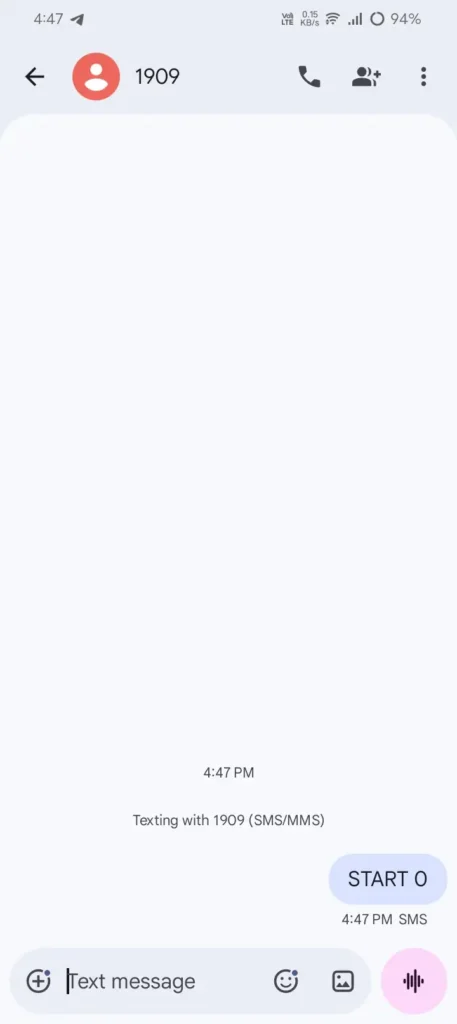
DND is especially for Indian users. If you are in India, you can register your mobile number with DND, which is (Do Not Disturb) with your telecom provider. This helps in stopping calls from telemarketers, scammers, etc.
You can register by following the steps below:
- SMSing “START 0” to 1909, or
- Calling 1909, or
- Using your operator’s app (Jio, Airtel, Vi all have this option)
These registrations take just a few minutes, which helps in avoiding spam calls.
Checklist To Avoid Spam Calls:
| Action | Time Required |
|---|---|
| Enable Android Spam Protection | 2 minutes |
| Enable Call Screen | 2 minutes |
| Install Truecaller | 5 minutes |
| Register DND | 2 minutes |
| Block Repeat Offenders | Ongoing |
| Limit Number Sharing | Long-term benefit |
Also Read: How to Fix Android Battery Drain: 7 Simple Tips That Actually Work
Also Read: How to Save Mobile Data on Android-10 Tips That Work
Also Read: Google Play Store tips and tricks India (2026)
Conclusion:
If you guys are tired of your phone ringing with spam calls. Spam calls are very frustrating, which are mostly due to with fake loan offers, and telemarketing, etc. You need to just follow the above tips to get of this problem.
Try to start with Android’s built-in spam protection, because it is free and it is very easy to enable. Still, if you get spam calls, then go with Truecaller and register for DND this will work like an extra layer protection to stop spam calls. You need to stop sharing your mobile with all third-party platforms.
No single solution will stop every spam call. You need to stop spam calls by combining all these methods. You will see a big difference. Honestly, saying I have performed all these tips on my mobile. 90% of spam calls are blocked. You guys also try to implement all the above mentioned step to get out of this problem. And mention in the comment whether the tips are working with your mobile?
FAQ’s
1. Can Android block spam calls without installing an app?
Yes. Google’s Phone app includes built-in spam detection and call filtering features.
2. Is Truecaller safe to use?
Generally yes, but users should review privacy settings and permissions before enabling contact syncing.
3. Does DND stop all spam calls?
No. It mainly reduces calls from registered telemarketers. Scam callers may still get through.
4. Why am I still getting spam calls after blocking numbers?
Many spammers use rotating numbers, making it difficult to block every caller individually.
5. What’s the best way to reduce spam calls?
Using Android’s built-in spam protection, Truecaller, DND registration, and careful sharing of your phone number together provides the best results.