Introduction
If you use an Android phone daily you will see storage warnings at some point. Apps crash, login problems appear, and small issues show up after updates. Most guides tell you to go to Settings, tap Apps, and choose Clear Cache vs Clear Data.
At first both options look the same. Most people think they are just two versions of the same tool. They are not.
I made this mistake myself once. I pressed Clear Data when I only wanted to remove some old files. Within seconds I was logged out completely. My saved settings were gone and I had to set everything up again.
That one mistake made me look deeper into how Android stores app information. This article explains exactly what happens inside your phone when you press either button.
How Android Keeps App Storage Organized
Android gives every app its own private storage space. One app cannot look inside another app’s files. This keeps your information safe and separate.
When you install an app Android creates a few different storage areas. Each area holds a different type of information. Knowing this is the key to understanding everything else.
App Program Files
These are the files that make the app actually run. They are stored separately from everything else. Clearing cache or data never touches these files at all.
Internal Data Folder
This folder holds your login details, saved settings, app databases, and personal content. It is the most important storage area for any app. This is what Clear Data removes.
Cache Folder
Inside the app’s private space is a separate folder for temporary files. These files only exist to make the app load faster. They are not important for the app to work.
Outside Storage
Some apps also save files in shared areas like Downloads or Pictures. These files usually stay safe when you clear cache or data. Most people never need to worry about this.
What Happens When You Tap Clear Cache
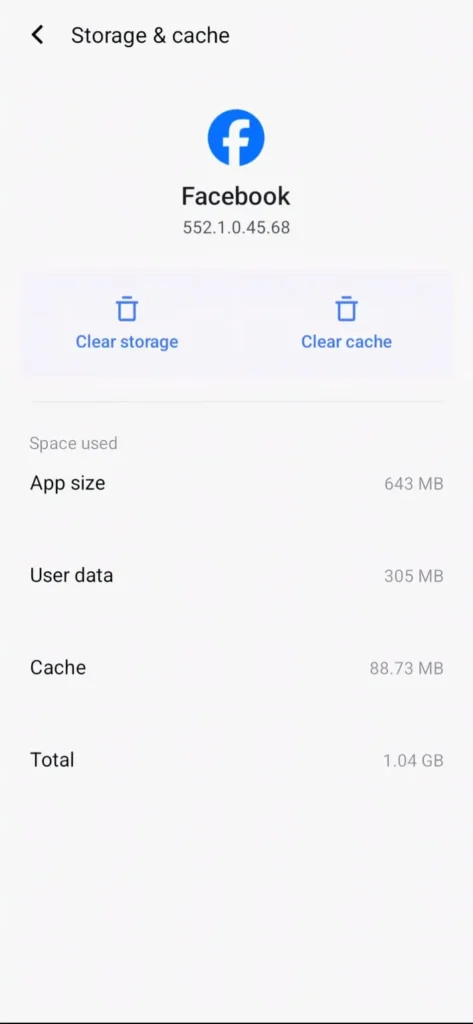
When you tap Clear Cache Android only deletes the temporary files in the cache folder. Nothing else changes. Only those temporary files go away.
These files include saved images, recently loaded pages, video previews, and saved search results. They are not needed for the app to work. They just help it load a little faster.
You do not get logged out. Your passwords stay where they are. Your settings stay the same. The app keeps working normally.
The next time you open the app it saves those temporary files again on its own. The whole thing is built to be completely reversible.
I once saw a social media app using almost 900MB of cache on my phone. My storage was almost full but the app itself was fine. I cleared cache and got that space back right away.
For a short time photos took a little longer to load. Then everything went back to normal. That is how cache is supposed to work. It comes back on its own.
Why Cache Gets So Big
Apps today use a lot of photos and videos. High quality images, short video previews, and feeds with lots of content all create temporary files very fast.
If you scroll through posts daily or watch short videos often the app saves previews to load them faster next time. A large cache size does not mean something is broken.
What Happens When You Tap Clear Data
Clear Data is a very different thing. It is much bigger than most people think. This is not a cleaning tool. It is a full reset.

When you press Clear Data Android deletes everything inside the app’s private storage area. Your login gets removed. Your saved settings disappear. All your personal data inside the app gets deleted.
After this the app goes back to exactly how it was the day you first installed it. Everything you did inside that app is gone from the phone.
You get logged out right away. You have to enter your login details again. Your personal settings disappear. You may need to give the app its permissions again too.
A family member once had a food delivery app that kept closing right after opening. Clearing cache did not help at all. The app would open and shut instantly every time.
We wrote down the login details and then cleared data. The app opened fresh, set itself up again, and worked perfectly. Something inside the app’s saved files had broken. Clear Data fixed it completely.
Clear Cache vs Clear Data: Main Differences
Clear Cache only removes temporary files. Clear Data removes everything the app saved on your phone. These two things are very different from each other.
Clear Cache is safe to use anytime. You can do it without worrying about anything. Clear Data should only be used when you have a good reason.
Clear Cache never logs you out. Clear Data always logs you out. Clear Cache never changes your settings. Clear Data wipes everything clean.
Clear Cache fixes small problems sometimes. Clear Data fixes bigger problems that nothing else can fix. The right choice depends on what is going wrong.
Does Clearing Cache Make Your Phone Faster?
Sometimes yes. But not always.
If bad temporary files are causing the app to slow down or freeze then clearing cache helps. But if the problem is something else clearing cache will not fix it.
Right after clearing cache some apps feel a little slower. They need to save those temporary files again. Things go back to normal quickly after that.
Does Clearing Data Delete Everything Forever?
It deletes everything saved inside the app on your phone. Whether you lose it forever depends on whether the app saves your data online.
Email apps bring everything back after you log in again. Online storage apps put your files back on their own. Some games bring back your progress if your account is saved online. But apps that only save things on your phone may lose your data forever.
Before clearing data always check three things. Is your account saved online somewhere? Is backup turned on? Do you remember your login details? If the answer to any of these is no then stop first.
When Should You Use Clear Cache?
Use Clear Cache when an app has small problems. Use it when the app is not refreshing its content. Use it when your phone storage is getting full or when the app shows old images.
It is safe and nothing bad will happen. You can do it on any app without worrying. Think of it as a quick routine cleanup.
When Should You Use Clear Data?
Use Clear Data only when the app crashes right after opening. Use it when your login keeps failing even with the right password. Use it when nothing else has worked.
Think of it as a last option. Not a first step. Not a quick fix. Only use it when you really need to.
What About Security and Privacy?
Clear Data removes your saved login details from the phone. If someone else is using your phone clearing data from important apps stops them from getting in.
But it does not remove data saved in other places on the phone. If you are giving your phone to someone else permanently you need a full factory reset. Clear Data only works on one app at a time.
Common Mistakes People Make
Using Clear Data when they only needed to free up some space is the biggest mistake. It causes login problems and lost settings that did not need to happen.

Forgetting their password before resetting an app is another common problem. Always make sure you know your login details before pressing Clear Data. Thinking Clear Cache will fix serious app problems is also a mistake. Some problems only Clear Data can solve.
The Right Order When an App Has Problems
Follow this order every time. Force stop the app first. Then clear cache and restart your phone. Only use Clear Data if the problem is still there after all of that.
This order stops you from losing data you did not need to lose. Most problems get fixed before you even get to Clear Data.
Also Read: How Voice Assistants Understand Accents Using Machine Learning (Complete Guide)
Also Read: Inside App Updates: What Really Changes After Update
Conclusion
Clear Cache vs Clear Data is not just about storage space. It is about knowing how your phone handles app information.
Clear Cache removes temporary files safely. Clear Data wipes the app clean completely. These are two very different tools for very different situations.
Once you know what each button actually does you stop guessing. You fix problems the right way the first time. That simple knowledge saves a lot of unnecessary headaches.
FAQ’s
1. Is it safe to clear cache regularly?
Yes it is completely safe to do anytime. Cache files are temporary and the app creates them again on its own. Clearing them never removes your personal data or login details.
2. Will clearing data delete my chats or history?
If the app saves things only on your phone and you have no backup then yes it may delete them. If the app saves your data online it will come back after you log in again. Always check before pressing Clear Data.
3. Why does cache grow so fast?
Using apps with lots of photos and videos creates temporary files very quickly. The more you use the app the bigger the cache gets. This is normal and does not mean anything is wrong.
4. Can clearing data fix app crashes?
Yes if the crash is caused by broken files inside the app. It resets the app fully back to how it was when first installed. This fixes problems that clearing cache alone cannot solve.
5. Which should I try first when an app stops working?
Always try Clear Cache first. If the problem keeps happening then use Clear Data but only after making sure you have your login details ready. This order keeps your data safe.