Introduction
I had been using Android for three years thinking I knew my phone well. Then a friend took my phone, opened my settings, and showed me five features I had never seen before. All of them were already there. I had just never looked.
These are the AI tools already built inside your Android phone right now. No downloads, no subscriptions, nothing to buy. Just features most people never find.
Why Android Hides These AI Tools
Android does not hide these tools on purpose. They are just not advertised loudly. Most people never dig into their settings deeply enough to find them.
Google builds AI into Android at a very deep level. Some features are turned off by default. Some are buried inside menus most people never open.
Finding these tools costs you nothing. You do not need to download anything. You do not need a premium subscription. Everything is already there waiting for you.
1. Live Caption (AI Subtitles for Any Audio)
This is one of the most impressive AI tools on Android. It adds captions to any audio playing on your phone automatically. Any video, podcast, call, or audio message gets captions in real time.
It works completely offline. No internet connection needed at all. The AI processes everything directly on your device.
You can find it in your volume controls. Press the volume button and look for the caption icon. Tap it and captions appear instantly on any audio your phone plays.
I used Live Caption during a noisy commute once. A video I wanted to watch had no subtitles. Live Caption added them instantly without any setup. I read every word perfectly in a loud crowded space.
It also works during phone calls. The other person’s words appear as text on your screen in real time. This is incredibly useful in noisy environments or for people with hearing difficulties.
2. Now Playing (Identify Songs Automatically)
This feature runs silently in the background every single moment. It listens for music playing around you using your microphone. It identifies the song and shows the name on your lock screen.
It does this entirely on your device. No audio ever gets sent to any server. The entire music recognition database is stored locally on your phone.
You never have to open Shazam or any music app. Just look at your lock screen. The song name is already there waiting for you.
This feature is available on Pixel phones natively. Other Android phones can get it through apps like Now Playing History. It is one of the most quietly useful AI features ever built into a phone.
3. Google Assistant Routines
Most people use Google Assistant for simple commands. Set a timer. Play a song. Check the weather. That is only scratching the surface.
Assistant Routines let you chain multiple actions together with one single command. Say “Good morning” and your phone turns off silent mode, reads your calendar, gives you the weather, and plays your morning playlist all at once.
You create these routines yourself in the Google Assistant settings. The AI learns your patterns over time. It starts suggesting routines based on what you do every day.
I set up a “leaving home” routine once. One command locks my settings, turns off WiFi, turns on mobile data, and opens Google Maps automatically. Something that took eight taps now takes three seconds. That time adds up every single day.
Automating tasks on your phone saves more time than most people realize. If you want to see how AI is already handling everyday decisions on your phone beyond just routines, read how everyday tasks on your mobile are already being controlled by AI without you noticing.
4. Smart Reply Everywhere
Smart Reply is not just for Gmail. Android has built smart reply suggestions deep into the notification system. Reply suggestions appear directly in your notifications without opening any app.
The AI reads the incoming message and suggests two or three short replies instantly. Tap one and the reply sends immediately. You never open the app at all.
This works across WhatsApp, Telegram, Instagram, and many other messaging apps. The AI understands context and tone. It suggests replies that actually make sense for the specific message received.
It saves real time throughout the day. Small interactions that used to require unlocking your phone and opening an app now take one tap from the notification shade.
5. Adaptive Battery
Most people know Adaptive Battery exists. Almost nobody knows how deeply the AI manages it behind the scenes.
Adaptive Battery studies every single app you use. It tracks which apps you open at what times of day. It learns your complete daily usage pattern over several weeks.
Apps you never use get put into deep sleep permanently. Apps you use every morning get resources prepared in advance. The AI predicts your behavior and manages power accordingly.
The system also learns your charging habits. If you charge every night at the same time it learns this. It delays full charging until just before your usual wake time. This reduces battery aging significantly over months of use.
I noticed my battery lasting almost two hours longer after using the same phone for three months. The AI had learned my patterns completely by then. The improvement happened without me changing anything at all.
Your battery life is also affected by how you use your apps daily. If your phone still drains fast even with Adaptive Battery enabled, check how your app usage habits are slowing down your phone and what simple changes fix it.
6. On Device Search
Android has a powerful search system that indexes everything on your device locally. Your messages, files, apps, contacts, and settings are all searchable from one place.
This search is powered by AI that understands natural language queries. You do not need to use exact words. You can search conversationally and the AI understands what you mean.
Type “photo from last Christmas” and it finds your Christmas photos automatically. Type “message from mom about dinner” and it finds that specific conversation. The AI understands context not just keywords.

Everything happens on device. None of your personal data gets sent anywhere. Your private files stay completely private while still being searchable and findable.
7. Pixel Call Screen
This is one of the most useful hidden AI tools for Pixel phone users. When an unknown number calls you do not have to answer it yourself.
Google Assistant answers the call for you. It asks the caller who they are and why they are calling. You watch the conversation transcribed in real time on your screen. Then you decide whether to pick up or decline.
The caller never knows they are talking to an AI unless you choose to tell them. The whole thing feels completely natural from their side.
Call Screen has saved me from countless spam calls and sales pitches. I see exactly who is calling and why before I ever speak to them. I have not answered an unwanted call in over a year because of this feature.
8. Gboard AI Features
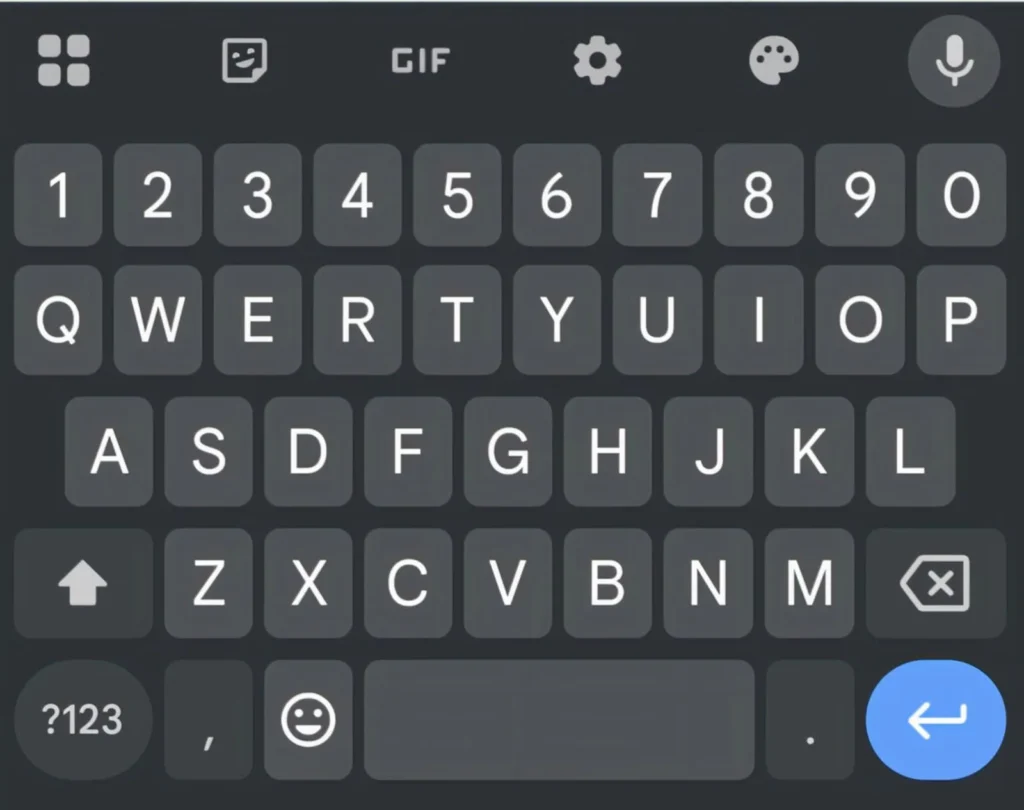
Most people use Gboard as just a keyboard. It is actually one of the most AI packed apps on any Android phone.
Gboard predicts your next word before you type it. It learns from your writing style over time. It even learns words and phrases specific to your personal vocabulary that do not exist in any standard dictionary.
It also has built in translation. Type in any language and translate instantly without leaving your current app. The translation happens in real time as you type each word.
Gboard also has a built in search tool. Search Google, YouTube, and Maps directly from your keyboard. Share results instantly into any chat without switching apps at all.
I use the translation feature constantly when messaging friends who speak different languages. The AI translates my words perfectly in real time. The whole conversation stays in one place without any app switching.
9. Google Photos AI Features
Google Photos looks like a simple photo storage app from the outside. Inside it is one of the most powerful AI tools on Android.
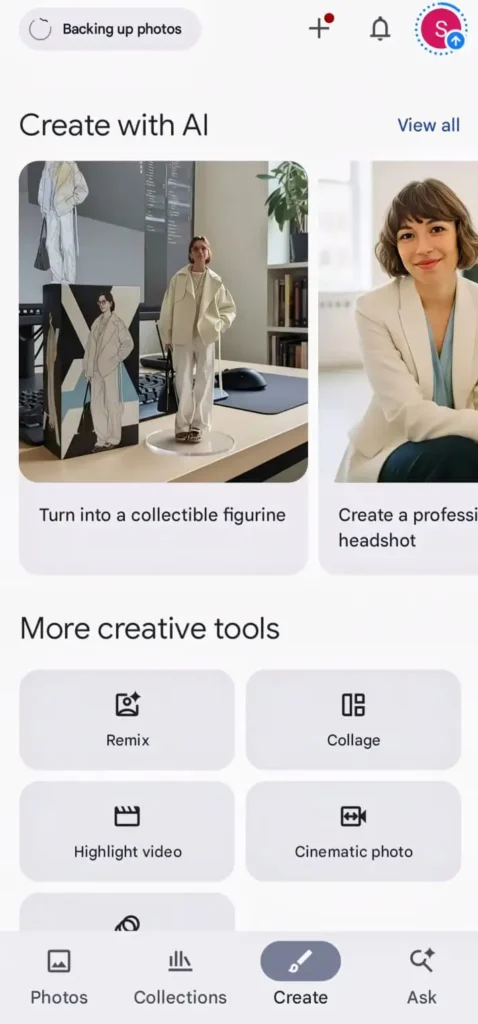
It scans every single photo and video you take. It identifies faces, places, objects, food, animals, and even emotions in photos. Then it organizes everything automatically without you doing anything.
The search feature is genuinely impressive. Type any word and find photos containing that thing instantly. Type “sunset” and every sunset photo appears. Type “birthday cake” and every celebration appears immediately.
Google Photos also creates automatic movies, collages, and animations from your photos. The AI picks the best photos from a trip or event and edits them together automatically. You get a finished memory without doing any editing work yourself.
It also has a powerful eraser tool. The AI removes unwanted objects from photos automatically. Remove a stranger from your background, a wire crossing the sky, or any unwanted element from any photo with just one tap.
Google Photos is just one example of AI hiding inside apps you already use. There are many more hidden tools inside popular apps that most users never discover. Read about the hidden features inside popular apps that can change how you use your phone every day.
10. Sound Notifications
This hidden AI tool converts sounds around you into visual alerts. It uses your microphone to listen for specific sounds. When it hears them it sends you a notification on screen.
It can detect a baby crying, a dog barking, a smoke alarm, running water, a doorbell, or someone knocking at your door. When it hears any of these it vibrates your phone and shows you what sound it detected.
This is incredibly useful for people with hearing difficulties. But it is also useful for anyone wearing headphones who cannot hear what is happening around them.
Find it in Settings under Accessibility then Sound Notifications. Turn it on and choose which sounds you want it to detect. The AI handles everything else automatically from that point.
11. Heads Up Feature
This is a hidden safety feature most Android users have never heard of. It detects when you are walking while looking at your phone screen. Then it reminds you to look up at your surroundings.
The AI uses your phone camera and motion sensors together. It recognizes the walking while phone gazing pattern specifically. It sends a gentle reminder to pay attention to where you are going.
Find it in Digital Wellbeing settings on supported Android phones. It is turned off by default. Turn it on once and forget about it. The AI watches out for you automatically from then on.
12. Interpreter Mode
Google Assistant has a built in interpreter mode that most people completely overlook. It translates conversations between two people speaking different languages in real time.
One person speaks in their language. Assistant translates instantly to the other language. The second person responds. Assistant translates back. A full conversation flows naturally between two people who share no common language.
Ask Google Assistant to be your interpreter. Say the languages you need. Start talking. The AI handles everything else completely.
I used this once during a trip when I needed to communicate with someone who spoke no English. It worked perfectly for a full five minute conversation. Neither of us needed a single common word between us.
13. Adaptive Brightness
Most people think adaptive brightness just adjusts screen brightness based on ambient light. The AI does much more than that simple adjustment.

It watches how you manually adjust brightness throughout the day. It learns that you prefer slightly dimmer brightness in the morning. It learns you want brighter settings at midday outdoors. It learns your evening preferences too.
Over several weeks it starts predicting your brightness preferences before you change them manually. The screen adjusts to your preferred level automatically in different situations. You stop touching the brightness slider almost completely.
This AI learning happens silently every single day. Most people never notice it working. They just notice their screen always looks right without them doing anything.
14. Digital Wellbeing AI
Digital Wellbeing is more than a screen time tracker. The AI inside it studies your phone usage patterns deeply over time.
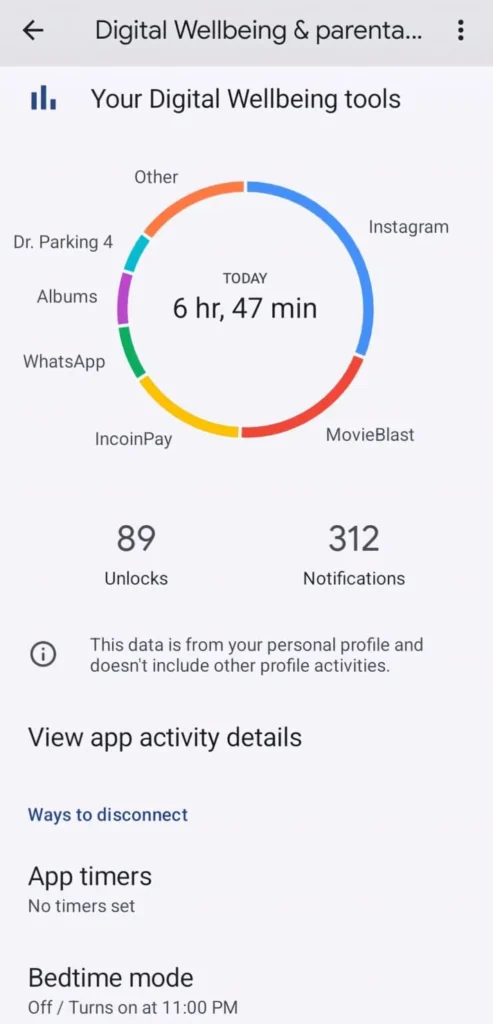
It tracks which apps take most of your time. It shows you exactly when during the day you use your phone most. It identifies patterns you never noticed about your own behavior.
It also has a Focus Mode that uses AI to suggest which apps to block based on your stated goals. If you want to focus on work it suggests blocking the apps that most commonly distract you specifically.
The Bedtime Mode dims your screen and silences notifications automatically when your regular sleep time approaches. The AI learns your sleep schedule and starts the bedtime mode at the right time without you setting any alarm.
Understanding your phone usage patterns also helps you manage your apps more effectively. If you have many apps installed and want to stay organized without slowing your device down, read our guide on how to manage multiple apps efficiently.
15. Emergency Location Sharing
This hidden AI tool works completely in the background every moment. When you call emergency services your phone automatically shares your precise location with them.
The AI combines GPS data, WiFi signals, mobile tower data, and sensor information to calculate your most accurate possible location. It does this even when GPS signal alone would be inaccurate.
It also detects car crashes automatically on supported devices. If the AI detects a sudden impact consistent with a crash it asks if you are okay. If you do not respond it calls emergency services and shares your location automatically.
This feature requires no setup from you at all. It is already active on your phone right now. The AI runs silently in the background protecting you without you ever thinking about it.
How to Find These Hidden Features
Most of these features live in places most people never look. Start with your Accessibility settings. Several powerful AI tools live there that have nothing to do with accessibility in the traditional sense.
Check your Digital Wellbeing settings next. Google has hidden several smart AI features inside that menu. Then explore your Google Assistant settings deeply. The routine and interpreter features are buried there.
Update your phone regularly. Google adds new AI features through system updates frequently. Keeping your Android updated means always having the latest AI tools available immediately.
If you are a student looking for AI tools that go beyond your phone settings, read our guide on AI chatbots for students to solve problems and how they can help with learning every day.
Conclusion
Your Android phone is much smarter than you ever realized. These AI tools are already inside it right now. They are waiting for you to turn them on and use them.
Live Caption adds subtitles to everything. Now Playing identifies music silently. Smart Reply saves time in every conversation. Adaptive Battery learns your habits deeply. Call Screen protects you from unwanted callers.
These are not features you need to pay for. They are not apps you need to download. They are tools Google built into Android that most users simply never discover.
Explore your settings this week. Find two or three features from this list. Turn them on and use them for a few days. You will wonder how you ever used your phone without them.
FAQ’s
1. Do these hidden AI features drain my battery faster?
Most of these features are designed to run very efficiently in the background. Features like Adaptive Battery and Adaptive Brightness actually improve your battery life over time. Live Caption and Sound Notifications use slightly more power but the impact is very small in everyday use.
2. Do these AI tools send my personal data to Google servers?
Many of these features process everything entirely on your device with no data sent anywhere. Live Caption, Now Playing, and on device search all work completely offline. Features like Google Assistant routines do communicate with Google servers to function properly.
3. Are these features available on all Android phones or only Pixel phones?
Some features like Call Screen and Now Playing are exclusive to Pixel phones. Most others like Live Caption, Smart Reply, Adaptive Battery, and Digital Wellbeing are available on most Android phones running recent versions of Android. Check your specific phone settings to see which ones are available.
4. How long does it take for AI features like Adaptive Battery to learn my habits?
Most adaptive AI features need two to four weeks of regular use to learn your patterns accurately. The first week shows small improvements. By the end of week three the AI has a very accurate picture of your habits and preferences. Consistent daily use speeds up the learning process significantly.
5. Can I turn off these AI features if I do not want them running on my phone?
Yes every single feature mentioned can be turned off completely from your phone settings. None of them are forced on you permanently. Go to Settings and search for any feature name to find its on and off toggle immediately.