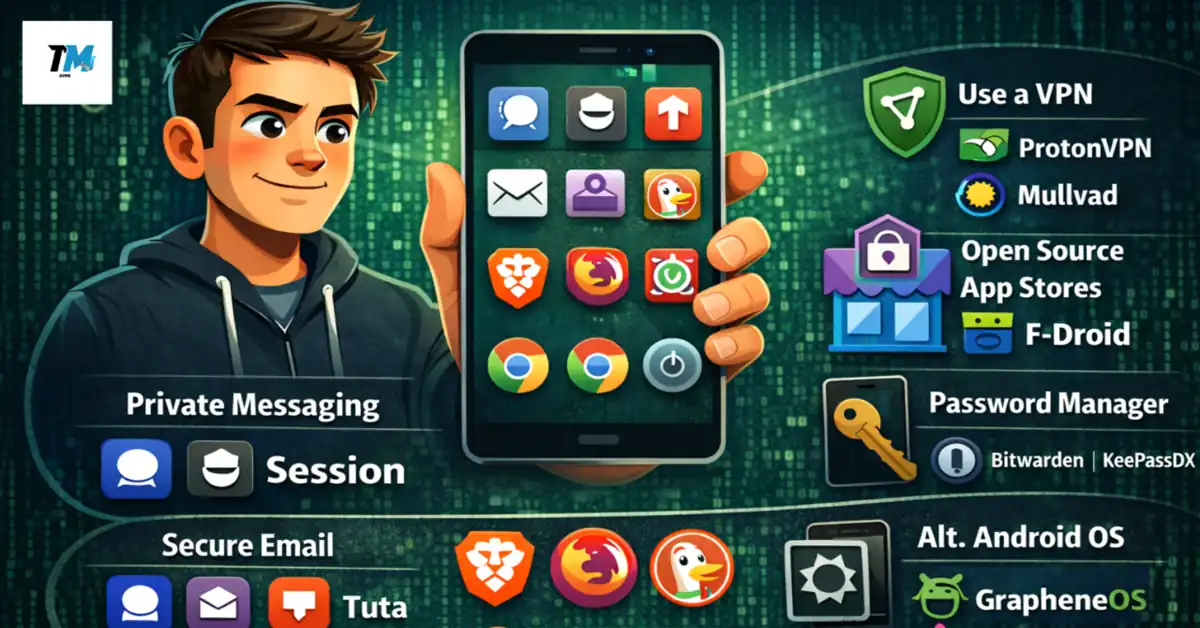
Hi guys, I know that Your phone knows more about you than your best friend. But
It tracks where you go, what you search for, who you talk to, and even what you buy. The truth? Most Android apps are designed to collect your data and sell it to the highest bidder.
But here’s the good news: you don’t have to accept this as normal. Privacy focused Android apps give you back control without asking you to become a tech wizard.
Why Your Android Privacy Actually Matters
Think your data isn’t valuable? Think again. According to research, companies collect everything from your location history to your browsing habits. Google’s own privacy policy admits they collect “the content you create, upload, or receive from others when using our services.”
This isn’t just about targeted ads anymore. Your data gets packaged, sold, and used in ways you’d never agree to if someone asked you directly. Data breaches happen constantly, and every app with access to your information becomes another potential leak.
The Android operating system itself isn’t the problem. Android is open-source at its core. The issue lies with the apps and services layered on top, especially those from major tech companies.
The Essential Privacy Apps You Need Today
Messaging Without the Surveillance
Signal has become the gold standard for private messaging. When whistleblowers and journalists need to communicate securely, they turn to Signal. The app uses end-to-end encryption for everything texts, calls, photos, and videos.
What makes Signal different? It’s completely open-source, meaning security experts can examine the code for vulnerabilities. The organization behind Signal stores zero metadata. They can’t see your contact list, group memberships, or even when you send messages.
Best of all, Signal works exactly like the messaging apps you’re already used to. You can send GIFs, make video calls, and create group chats. The only difference is that no corporation can read your conversations.
Session takes privacy even further by removing phone numbers from the equation. You don’t need to provide any personal information to create an account. Messages route through a decentralized network, making it nearly impossible for anyone to track who’s talking to whom.
Email That Doesn’t Read Your Mail
Gmail scans every email you send and receive. They claim it’s for features like smart replies and spam filtering, but the reality is less comforting.
Proton Mail provides a secure and privacy focused android apps alternative to email services like Gmail and Outlook. Based in Switzerland, Proton Mail operates under some of the world’s strongest privacy laws. All emails between Proton users get automatically encrypted, and you can send password-protected messages to anyone, even if they don’t use Proton.
The Android app supports biometric locks, giving you an extra security layer. If you want to avoid Google entirely, you can download the APK directly from Proton’s website instead of using the Play Store.
Tuta (formerly Tutanota) offers similar protection with a slightly different approach. Their system encrypts not just your emails but also your contacts and calendar. Unlike traditional email providers, Tuta’s servers can’t read your messages even if they wanted to.
Browsing Without Being Followed
Every time you browse the web using Google’s Chromium Web Browser, you are being tracked, and a lot of your data is being collected. Even Incognito Mode doesn’t prevent Google from gathering information about your browsing habits.

Firefox Focus automatically blocks trackers and wipes your browsing history every time you close the app. It’s lightweight, fast, and removes the temptation to let tracking cookies pile up.
Brave goes a step further with built-in ad blocking and tracker prevention. The browser blocks third-party cookies by default and includes Tor integration for private browsing. Pages load faster when you’re not downloading dozens of tracking scripts.
DuckDuckGo Browser combines privacy protection with a familiar interface. It automatically forces websites to use encrypted connections when possible and gives each site a privacy grade so you know how much tracking is happening.
VPN Protection That Actually Works
A VPN (virtual private network) app is the biggest no-brainer privacy boost you can give to your Android device. VPNs hide your IP address from websites and hide the sites you visit from your internet provider.
ProtonVPN comes from the same team behind Proton Mail. They offer a genuinely useful free tier with unlimited data, which is rare among VPN providers. The company has been independently audited and maintains a strict no-logs policy.
Mullvad takes anonymity seriously. You don’t need an email address to sign up—they generate an account number for you. You can pay with cryptocurrency or even mail them cash. The service costs a flat rate with no premium tiers or gimmicks.
Beyond Individual Apps: Alternative App Stores
The Google Play Store itself tracks your behavior. Which apps you download, which ones you open most frequently, and how long you use them all get recorded.
F-Droid is a free and open source app store and software repository for Android, serving a similar function to the Google Play Store. The crucial difference? F-Droid only hosts free and open-source software. Every app gets built from public source code, so there’s no hidden tracking or proprietary spying.
F-Droid clearly marks any “anti-features” like advertising or user tracking in app descriptions. The F-Droid website lists the apps hosted, over 3,800, compared to millions on the Play Store. The smaller selection is actually a feature every app has been vetted for privacy and freedom.
Aurora Store offers a different approach. It provides anonymous access to Google Play apps without requiring a Google account. You can download the same apps available on the Play Store while minimizing tracking.
Installing F-Droid requires enabling “unknown sources” in your Android settings, but it’s worth the extra step for the privacy benefits.
Password Management Without the Risk
Reusing passwords is dangerous. Having a different strong password for every account is impossible to remember. That’s where password managers come in.
Bitwarden is open-source, which means security researchers can verify it’s not secretly sending your passwords anywhere. The basic version is free and includes everything most people need. Your passwords stay encrypted with a master password that only you know even Bitwarden can’t access your vault.
KeePassDX takes an even more private approach by storing everything locally on your device. There’s no cloud sync, which means no potential for server breaches. You can manually sync your password database across devices using tools like Syncthing.
Two-Factor Authentication Done Right
Aegis is a free, secure and open source app for Android to manage your 2-step verification tokens. It supports imports from other authenticator apps, encrypts your vault, and works completely offline. Unlike Google Authenticator, Aegis lets you export your codes so you’re not locked into one device.
ente Auth offers cloud-based backup while maintaining encryption. Your two-factor codes sync across devices, but the service can’t read them because of end-to-end encryption.
Making the Switch Without Losing Your Mind
Moving to privacy focused android apps doesn’t mean abandoning convenience. Start with one category at a time. Install Signal and suggest it to your most frequent contacts. Set up Proton Mail but keep your old email for a transition period. Try Brave or Firefox Focus as your default browser for a week.
You don’t need to go completely off-grid overnight. Even replacing a few surveillance-heavy apps with privacy-respecting alternatives makes a meaningful difference.
The learning curve is smaller than you think. Most privacy apps work similarly to their mainstream counterparts. The main difference is what happens behind the scenes with your data.
The Bigger Picture: Operating System Alternatives
For users willing to take privacy more seriously, custom Android ROMs remove Google services entirely. GrapheneOS is a privacy and security focused mobile OS with Android app compatibility developed as a non-profit open source project. It runs on Google Pixel phones but strips out all the tracking.
CalyxOS and LineageOS offer similar privacy improvements without Google’s constant surveillance. These require more technical knowledge to install, but they represent the ultimate in Android privacy.
Common Privacy Mistakes to Avoid
Don’t assume “free” always means “privacy-focused.” Many free apps make money by selling your data. Read the privacy policy or check if the app is open-source.
Avoid apps that request excessive permissions. A flashlight app doesn’t need access to your contacts, location, and microphone. Android lets you deny specific permissions even if an app asks for them.
Keep your apps updated. Security vulnerabilities get discovered regularly, and updates patch these holes. Enable automatic updates for your privacy apps.
Conclusion
Start simple. Download F-Droid and browse the available apps. Install Signal and send a message to a friend. Replace Chrome with Brave or Firefox Focus. Each small change reduces how much data you’re leaking.
Your digital privacy isn’t about paranoia it’s about basic respect for your personal information. Companies have convinced us that surveillance is normal and necessary. It’s not.
Privacy focused Android apps prove you can have a fully functional smartphone without surrendering everything about yourself to data brokers. The tools exist. They’re free. They work.
The only question is whether you’ll use them.
Also Read: Why Some Mobile Games Require Internet Even for Single Player
Also Read: How Mobile Games Are Designed to Increase User Engagement